
Business Process Automation in 2026: How to Map, Build and Improve Workflows
Business process automation guide for 2026: map workflows, choose tools, add controls, measure ROI and build reliable automated processes.

Business process automation helps small businesses remove repetitive work, reduce handoffs and build more reliable workflows when the process is mapped before automation begins.
Editorial note: This article is educational and based on practical software-selection and workflow principles. Product features, limits and pricing may change after publication.
Affiliate disclosure: Some links may be affiliate links. AutomationToolLab may earn a commission at no additional cost to you.
Business process automation is not about replacing every manual action. It is about removing predictable work, reducing handoffs and making important processes easier to monitor. This guide shows how to design automation that remains understandable and reliable after the first successful test.
Business Process Automation Starts With the Process
In practice, Business process automation works best when the underlying process is already understood. If a team cannot explain what starts the work, what information is required, what decision rules apply and what a successful outcome looks like, automating it usually makes the confusion move faster.
Begin by writing the process in plain language. Identify the trigger, the data needed, the sequence of steps, decision points, approvals, exceptions and final destination. For example, a lead-routing workflow might begin when a form is submitted, enrich the company record, score the lead against documented criteria, send qualified leads to a sales queue and send low-fit leads to a nurture sequence. That is specific enough to automate and test.
For example, Avoid automating every step immediately. Keep human review around money, contracts, deletion, customer promises, sensitive communication and unusual exceptions. The objective is reliable throughput, not maximum automation percentage.
Business Process Automation: Six Layers of a Reliable Workflow
1. Trigger
The trigger is the event that starts the workflow: a new form submission, an email, a payment, a scheduled time, a CRM stage change or an API event. Reliable triggers should be specific enough to avoid accidental runs.
Business Process Automation: 2. Data collection
In addition, Gather only the information required for the next decision. Validate required fields early. A workflow that continues with missing customer IDs, malformed email addresses or incomplete order data will produce expensive errors later.
3. Decision rules
Use explicit business rules for deterministic decisions and AI only where interpretation is genuinely helpful. A discount threshold, account region or product type should usually be handled with logic. An unstructured support message may benefit from AI classification.
Business Process Automation: 4. Action
However, Actions create the business effect: create a task, update a CRM field, send a message, generate a document, add a row, open a ticket or call another application.
5. Exception handling
Every production workflow needs a failure path. Decide what happens when a required system is unavailable, an API rejects a request, the output is incomplete or a record cannot be matched.
Business Process Automation: 6. Monitoring
As a result, Track volume, success rate, failure rate, average processing time and meaningful business outcomes. A workflow can technically run without improving the business, so monitoring must include the result you actually care about.
Business Process Automation: 12 Processes to Automate First
- Lead capture and routing: enrich new leads, apply qualification rules and assign ownership.
- Sales follow-up reminders: create tasks when opportunities have no activity for a defined period.
- Customer onboarding: generate checklists, create folders, notify account owners and schedule milestones.
- Support triage: categorize tickets, identify urgency and route requests to the correct queue.
- Invoice intake: extract fields, validate required information and route for approval.
- Expense processing: capture receipts, categorize transactions and flag exceptions.
- Content production: move approved topics through brief, draft, review, design and publishing stages.
- Meeting follow-up: convert notes into tasks, decisions and CRM updates.
- Renewal management: create alerts and account tasks before contract or subscription dates.
- Review monitoring: collect new reviews and route negative feedback for timely response.
- Weekly KPI reporting: collect metrics and produce a standard executive summary.
- Employee onboarding: create accounts, checklists and training tasks after a hire is approved.
These processes are good candidates because they are usually frequent, rules-based and measurable. Start with one workflow where the current manual effort is obvious, then expand after reliability is proven.
Zapier, Make, n8n or Native Automation?
At the same time, Choose the platform based on the workflow rather than brand familiarity. Zapier is often attractive for teams that prioritize fast setup and broad app connectivity. Make is useful when visual multi-step scenarios and data transformation are central to the process. n8n can appeal to technically capable teams that want deeper workflow control or self-hosting options. Many SaaS products also include native automation that can be simpler than adding another platform.
Before choosing, compare integration coverage, branching and looping, data transformation, webhooks, API access, debugging, run history, credential management, team permissions and cost at your expected volume. A workflow platform becomes part of your operating infrastructure, so maintainability matters as much as the initial demo.
Business Process Automation: How to Measure ROI
Therefore, Measure the baseline before automating. Record how many times the process runs each month, the average manual minutes per run, error frequency and business delay. After automation, compare the same metrics.
A simple ROI model is: monthly labor time saved plus avoided error cost plus faster business value, minus subscription cost and maintenance time. Do not overstate the benefit by counting time that employees do not actually reclaim. If a workflow saves twenty minutes but still requires ten minutes of checking, measure the net ten-minute reduction.
More importantly, Also track quality. Faster processing is not an improvement if customer errors increase. For customer-facing or financial processes, accuracy and exception handling should be explicit success metrics.

Business Process Automation: Security and Governance
Automation platforms often connect to many business systems, which makes permissions important. Use least-privilege access, separate service accounts where appropriate, rotate credentials, review connected apps and remove workflows that are no longer in use.
For this reason, Document every critical automation with an owner, purpose, connected systems, credentials location, failure notification and recovery procedure. This avoids the common situation where a workflow silently becomes essential but nobody knows who maintains it.
Business Process Automation: A Practical Process-Mapping Example
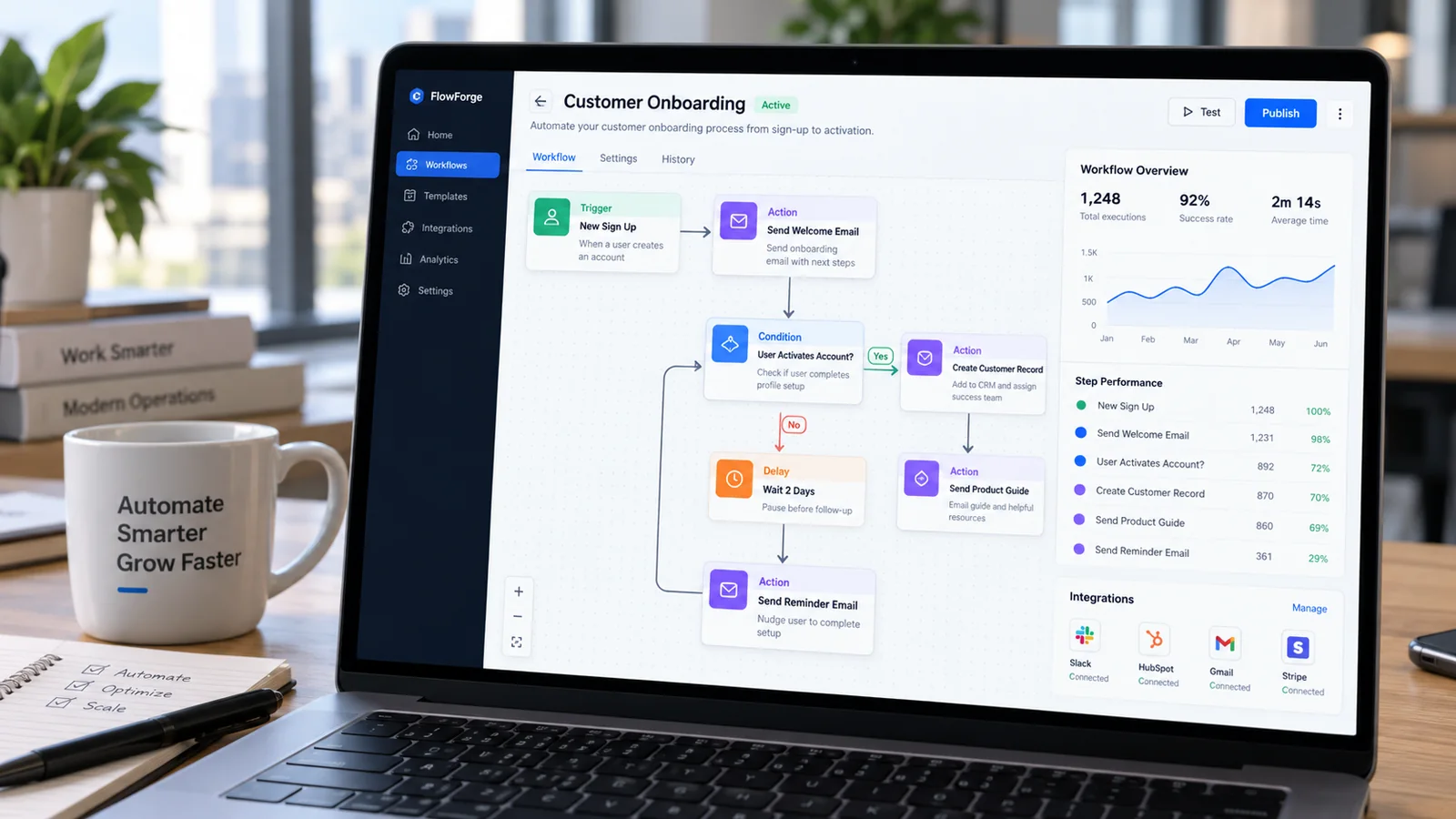
Suppose a small B2B company wants to automate new-customer onboarding. The manual process begins when sales marks a deal as won. An employee creates a project folder, copies customer details into a project tool, sends an internal handoff message, schedules a kickoff task and emails the customer a welcome message. Each step is simple, but the process is slow because different people complete it inconsistently.
Meanwhile, Map the current state first. The trigger is “deal status becomes won.” Required data includes customer name, primary contact, purchased service, sales owner and target start date. The first decision is whether all required fields are present. If not, the workflow should create an exception task for sales instead of continuing with incomplete information.
Once validation passes, the workflow can create the project, create or link the customer folder, assign an account owner, generate onboarding tasks and prepare the welcome email. The email can remain in draft until the account owner checks it. The system then records that onboarding was initiated and sends an internal confirmation. This design eliminates manual copying but keeps human judgment around customer communication.
In other words, That pattern—trigger, validate, act, review and confirm—can be reused across many processes. Mapping it on paper before opening an automation platform reduces rework and makes testing far easier.
Business Process Automation: Testing Production Workflows
Test normal records, incomplete records, duplicate records and unexpected values. If the workflow handles money, dates or customer identities, include edge cases such as zero values, international formats, missing fields and records that already exist downstream. Confirm what happens if the workflow runs twice.
Ultimately, Test dependencies too. Disconnect a credential in a safe environment, change a field name or simulate an API error. The workflow should fail visibly and alert an owner rather than silently losing data. For scheduled workflows, verify the timezone and confirm that daylight-saving changes do not alter intended timing for global teams.
Define acceptance criteria
Before launch, write what “working” means. For example: ninety-nine percent of complete onboarding records create all required tasks within five minutes; incomplete records create an exception task; no customer email is sent without human approval; failed runs notify operations within ten minutes. Clear acceptance criteria turn automation testing into an operational check instead of a vague impression.
Business Process Automation: Build an Automation Portfolio
In practice, As the company adds workflows, create a portfolio view. For each automation, track owner, business process, platform, monthly run volume, estimated hours saved, last review date and criticality. This helps identify high-value automations, duplicate workflows and processes that need stronger monitoring.
Classify workflows by risk. Low-risk automations might create internal reminders or copy non-sensitive data. Medium-risk workflows may update customer records or send internal alerts. High-risk workflows can affect payments, contracts, security or external communications. The higher the risk, the stronger the validation, approval and monitoring should be.
When to Rebuild or Retire an Automation
For example, Automations should not live forever by default. Retire a workflow when the underlying business process disappears, when the SaaS product gains a simpler native capability or when maintenance cost exceeds the value saved. Rebuild when a workflow has accumulated too many patches, branches and exceptions to understand safely.
A useful rule is that another trained person should be able to explain the workflow from its documentation. If nobody can confidently predict what happens after a trigger, the automation has become operational debt.
Related AutomationToolLab Guides
- 25 AI Automation Ideas for Small Businesses in 2026
- Best No-Code Automation Tools in 2026
- Best Business Automation Tools to Save Time and Reduce Manual Work
Automation Documentation Template
In addition, For every important workflow, document the purpose, owner, trigger, connected systems, credentials owner, required inputs, decision rules, outputs, failure notification, recovery method and last review date. This can be a one-page record. The purpose is operational continuity.
Common Automation Failure Patterns
Watch for duplicate triggers, missing identifiers, changed field names, expired credentials, API limits and silent exceptions. Test workflows with missing data and unusual cases, not only perfect samples. A production automation is trustworthy when the team knows how it fails and how to recover.
Frequently Asked Questions
What should be automated first?
However, Choose high-frequency, rules-based work with low downside if something fails. Avoid starting with contracts, money movement or irreversible customer actions.
How much human review should remain?
Keep review wherever errors could create material customer, legal, financial or security impact. Reduce review only after reliability is measured.
Who should own automations?
As a result, Every important workflow should have a named business owner and a technical maintainer, even if both roles are the same person in a small company.
Implementation Notes for 2026
For business process automation, the practical challenge is rarely access to features. It is creating a repeatable operating method. Document who owns the workflow, what information is trusted, which outputs require review and how the team will recognize failure. This makes the software easier to train, easier to audit and easier to replace if the business later chooses another platform.
At the same time, Adoption should also be measured. Ask whether users complete the intended workflow, whether they create side processes outside the tool and whether data quality remains high. A product that technically supports a feature is not delivering value if employees avoid it because the process is too complex. Review the setup after the first month and remove fields, steps or automation that do not contribute to the desired result.
Finally, keep portability in mind. Export important data periodically when practical, document critical settings and avoid hiding essential business logic in a single employee’s personal account. Software choices change; operational knowledge should remain with the business.
Final Recommendation
Therefore, Automate a process only after you can describe it clearly. Build in validation, exception handling and ownership from the start, then scale from one proven workflow to a repeatable automation program.
Turn Better Software Decisions Into Better Website Growth
Choosing the right tools is only part of the job. If you also want to understand your website visibility, keyword opportunities, competitors and backlinks, explore CBOOMARANK. For available plans, visit the CBOOMARANK pricing page.
Related Software Guides