AI Agents for Small Business in 2026: Use Cases, Costs, Risks and Setup Guide
A practical 2026 guide to AI agents for customer support, marketing, operations, research and repeatable small-business workflows.
AI agents for small business are moving from experimental demos into practical tools that can research, draft, summarize, route tasks, update systems and support repeatable workflows. The opportunity is significant, but the best results do not come from switching on the newest autonomous feature. Small businesses need clear use cases, guardrails, measurable outcomes and a sensible way to decide where an agent should act independently and where a person should remain in control.
This guide explains what AI agents are, where they can create value, what they may cost, the risks to plan for and how to introduce them without creating unnecessary operational complexity. It is designed for owners and small teams that want practical automation rather than hype.
What are AI agents for small business?
An AI agent is software that can work toward a goal by using a language model, instructions, available data and connected tools. A normal chatbot usually answers a prompt and waits for the next instruction. An agent can go further: it may break a task into steps, retrieve information, use an application, evaluate the result and continue until a defined objective is reached.
For a small business, that might mean an agent that reviews an incoming support request, identifies the customer, checks an order, drafts a response and routes the case to a person if a refund or policy exception is required. Another agent might gather competitor information, summarize changes and prepare a weekly briefing for a marketing team.
The important distinction is not whether a vendor uses the word “agent.” The important question is whether the system can perform a useful sequence of actions with enough reliability, control and auditability to improve a real business process.
Where AI agents for small business create the most value
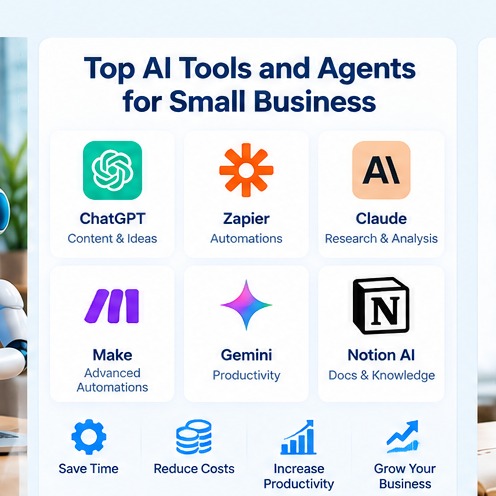
The best early use cases are repetitive, information-heavy and easy to verify. They usually involve many small decisions rather than one high-stakes decision. That makes it easier to save time while keeping the consequences of an error manageable.
AI agents for small business: Customer support triage
An agent can classify incoming messages, identify common issues, retrieve approved answers and draft a response. It can also detect requests that need human attention, such as billing disputes, legal complaints or unusual account changes.
The goal should not be to replace support. A better target is to reduce the time employees spend on repetitive sorting, searching and first drafts so they can focus on cases where judgment matters.
AI agents for small business: Sales research and lead preparation
Sales teams can use agents to gather public information about a prospect, summarize the company, identify likely pain points and prepare questions before an outreach call. A well-designed workflow can also standardize the way leads are researched so results are more consistent across team members.
Contact data and outreach claims should still be checked. Automated research can be fast, but it can also combine outdated or incorrect information.
AI agents for small business: Marketing research and content planning
Agents can collect topic ideas, cluster customer questions, summarize competitor content and turn raw research into an editorial brief. They can also help marketers create a repeatable workflow from research to outline to draft to review.
For search-focused work, combine AI assistance with real SEO data rather than relying on generated guesses about search demand. Tools such as CBOOMARANK can help teams analyze websites, keywords, competitors and backlink opportunities before deciding what content deserves investment.
AI agents for small business: Internal knowledge assistance
A small company often has useful information spread across documents, email threads, shared drives and project tools. An internal agent can help staff find policies, procedures, product details and past decisions faster.
This is a strong use case because employees usually know what a correct answer should look like. They can quickly spot weak output and improve the underlying knowledge base.
AI agents for small business: Routine operations
Agents can prepare meeting summaries, convert action items into tasks, format reports, reconcile simple records and draft routine internal communication. These workflows are especially useful when several applications must be used in sequence.
AI agents versus traditional automation
Traditional automation is best when the steps and conditions are known. For example: when a form is submitted, create a CRM record, send a confirmation and notify a salesperson. This is deterministic and easy to test.
AI agents are useful when the process includes unstructured information or judgment-like tasks. For example: read a long customer email, determine the likely request, summarize the issue and choose the right workflow.
In practice, the strongest systems combine both approaches. Traditional automation handles predictable actions while an AI model handles classification, extraction, drafting or reasoning inside clearly defined boundaries.
How much do AI agents cost?
There is no single price because the cost depends on the model, usage volume, platform, integrations and how much custom development is required. A small business may start with agent-like features already included in software it uses, while a larger workflow may require API usage, automation-platform fees and implementation time.
Evaluate cost in four layers: software subscription, model or API usage, integration effort and human review. A cheap tool can become expensive if employees spend hours correcting it. A more capable tool may be more economical if it reliably removes manual work.
The best metric is usually cost per completed business outcome rather than cost per prompt.
A practical framework for choosing an AI agent use case
Before adopting a new tool, score the process you want to automate. A strong candidate usually has high repetition, clear inputs, measurable output and low-to-moderate consequences when something goes wrong.
- How often does this task occur?
- How much staff time does it consume each week?
- Can we describe a correct result clearly?
- Can the agent access the information it needs safely?
- Can a person review the result quickly?
- What happens if the agent is wrong?
- Can we measure time saved, response speed, revenue or quality?
If the answer to the last two questions is unclear, the process is probably not ready for autonomous execution.
How to set up AI agents for small business safely
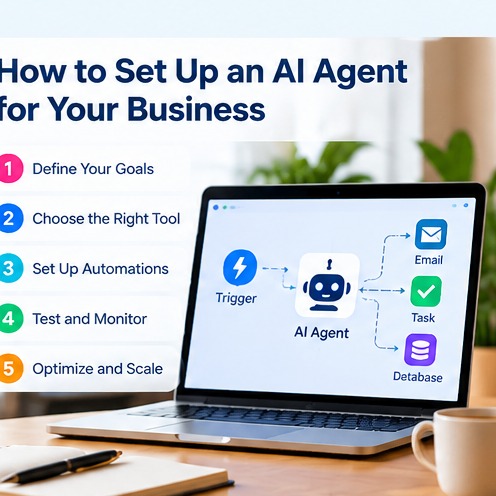
Step 1: document the existing workflow
Write down how the task is completed today. Include inputs, systems used, decision points, approvals and exceptions. Automation becomes much easier when the current process is visible.
Step 2: define the agent’s authority
Decide what the agent may do without approval. For example, allow the agent to read data and draft responses, but require approval before sending. Let it create tasks, but do not let it delete records. Require a person to approve every refund.
This boundary is essential. Document exactly where human review happens instead of treating it as a vague promise.
Step 3: connect only the minimum data required
Avoid giving an agent broad access because it is convenient. Use least-privilege access. If the task needs customer names and ticket history, it may not need payroll records or administrative credentials.
Review the security and privacy documentation of any provider before connecting sensitive systems. The Cybersecurity and Infrastructure Security Agency provides useful security guidance for organizations building safer technology practices.
Step 4: create a test set
Use real but controlled examples that represent normal cases, edge cases and known failure conditions. Measure how often the agent produces an acceptable result and where it fails.
Step 5: launch with review
Initially, require a person to approve actions. Then record common corrections. Those corrections will reveal whether the problem is poor instructions, missing data, weak integrations or a task that is simply too ambiguous.
Step 6: automate only proven steps
Once performance becomes stable, remove human approval only from low-risk steps. Keep review points around money, legal commitments, security changes, customer account access and other sensitive actions.
AI agents for small business: common risks and controls
Incorrect information
Language models can produce confident answers that are inaccurate. Reduce this risk by grounding agents in approved sources, requiring citations where appropriate and making high-impact outputs reviewable.
Prompt injection and malicious content
An agent that reads web pages, files or emails may encounter instructions designed to manipulate it. Treat external content as untrusted input. Limit tool permissions and separate data retrieval from privileged actions.
Privacy and confidential information
Do not assume every AI product uses data in the same way. Review retention, training, logging and enterprise privacy settings. Share sensitive data only when the business has a valid reason and appropriate controls.
Over-automation
A workflow can become harder to manage when too many steps depend on an agent. Start narrow. If employees cannot explain why an automated action happened, the system is becoming too opaque.
How to measure whether an AI agent is working
Measure business performance before and after the pilot. Useful metrics include average handling time, percentage of tasks completed without correction, response speed, cost per task, employee time saved, conversion rate and customer satisfaction.
A successful implementation does not need to eliminate human work. Saving ten minutes on a task performed hundreds of times per month can be more valuable than attempting full autonomy on a rare process.
Build a connected AI and automation stack
AI agents work best when they are part of a broader system rather than isolated experiments. A practical stack might include a language model for reasoning, an automation platform for deterministic workflows, a CRM, a knowledge base, analytics and an SEO platform.
If your team is evaluating the broader operational stack, see our AI tools for small business operations guide. For SEO, competitor and backlink intelligence, review CBOOMARANK and its plans and pricing.
AI agents for small business: implementation checklist
- Choose one repetitive, measurable workflow.
- Document the current process and exceptions.
- Define exactly what the agent may read and do.
- Use least-privilege access for connected systems.
- Test with normal, difficult and adversarial examples.
- Require human approval during the pilot.
- Track corrections and failure patterns.
- Measure time saved and outcome quality.
- Automate only low-risk actions after performance is proven.
- Review permissions and logs regularly.
Final thoughts
AI agents for small business can create meaningful leverage when they are assigned the right work. The strongest implementations are not the most autonomous; they are the ones that reliably remove friction from a clearly defined process while keeping people in control of consequential decisions.
Start with a narrow workflow, measure it, improve it and expand only when the evidence supports expansion. That approach turns AI from an interesting feature into an operational advantage.
Related Software Guides